Manage Attendees

You can manage your bookings from within your Events admin area or if you have BuddyPress enabled you can manage bookings for events you created from within your profile pages.
If you have disabled booking approvals from the booking options then bookings will automatically be confirmed and there will never be any pending booking screen messages like with the screenshot on the right.
This page shows a bookings table for upcoming event as well as a list upcoming events with bookings enabled. If booking approval is enabled then this will show pending bookings by default.
Booking Admin Pages
There are various pages which you will encounter when managing your bookings. These include:
- Dashboard - Main bookings page, shows all bookings and events
- Event - Single event and bookings for that event
- Ticket - View all bookings which have a specific ticket
- User - View all bookings belonging to a user
Each page shows bookings using the same booking table (see below), but restricts the types of booking shown according to the above.
The Bookings Table
Our bookings table provides a uniformed way of viewing and navigating your bookings in a quick loading and easy to use fashion.

Booking Links and Actions
The bookings table contains a useful 'Actions' column which is shown by default and contains various useful shortcuts.
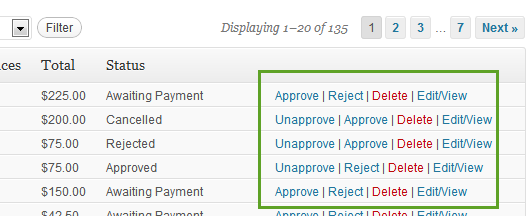
Aside from a link to edit the booking, depending on the booking status, the Actions column will contain links to Approve, Reject, Unapprove, Confirm and Delete the booking. For some actions (e.g. Approve, Cancel, Reject), clicking on these will automatically send a corresponding email to the attendee.
Filter Bookings
There are various options for filtering your bookings which can be used in combination:
- Event Scope (only when viewing bookings for all events) - You can choose to whether to view bookings for future/past/present events, and various other time ranges.
- Rows - Decide how many rows to show at once.
- Status - The status of the bookings
Show/Hide Columns
You can choose which columns to display and in whatever order you choose.
There are many columns to choose from, including custom fields you created in your form editor.
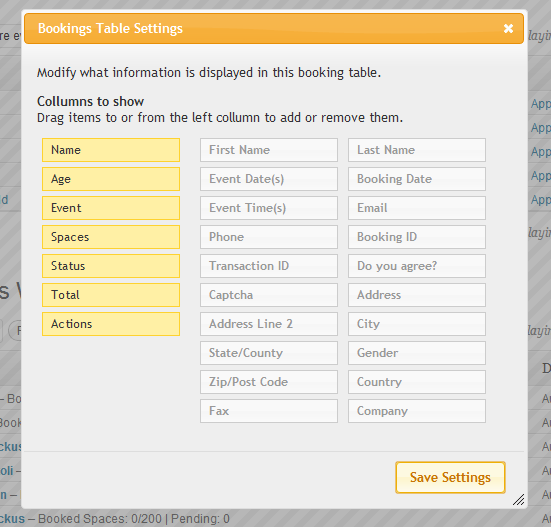
To add/remove columns, drag the ones you want to see to the left yellow column, and move unwnted ones back into the grey columns. You can arrange the order of columns by dragging them up and down.
Displaying Custom Fields From Pro
If you create custom fields in your booking forms or user fields, you should see these columns available on the right.
Exporting to CSV
Often you'll want to export booking information into a spreadsheet. CSV files can be read by most common spreadsheet applications including Office, Google Docs and Open Office.
When exporting, you'll have a similar choice of fields as when showing/hiding columns.
There is one difference, which is whether you check the Split bookings by ticket type box. When you click this, more fields will be made available such as Ticket Name and Ticket Price, which are not relevant to an entire booking.
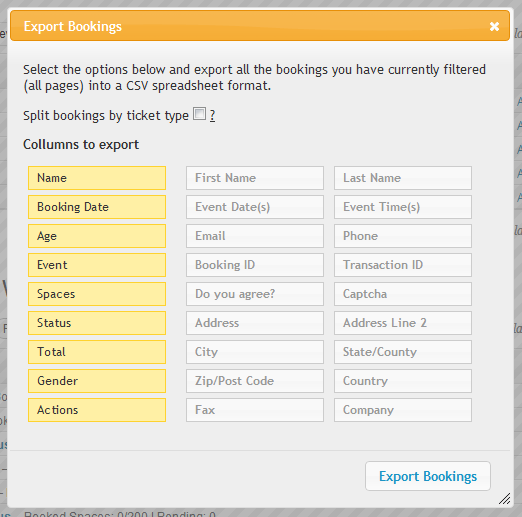 When you click the Export Bookings button, you should be offered a file to download. If you have exported bookings then you will see one row for each booking. If you are exporting bookings split by ticket type, you will see one row for each ticket type in each booking, and certain columns pertaining to the whole booking will repeat themselves (e.g. Name, Total Price, etc.). One useful column to include in ticket exports is the booking id, which links tickets to a single booking.
Edit Bookings Page
When you click on the view/edit link on a bookings table, you'll be taken to a page where you can view all the details about that specific booking, and edit details about the booking. This page contains various sections:
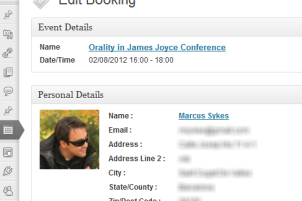
Event Details and Personal Details
These two sections are purely for informational purposes. These sections also provide links to view all bookings for this event as well as all bookings for this specific user.
To edit the user information, you should visit that user profile in the Users menu of your admin dashboard.
Booking Details and Editing
The Booking Details meta box is the central area for this form, as it contains booking-specific information and is also where you would edit the booking itself.
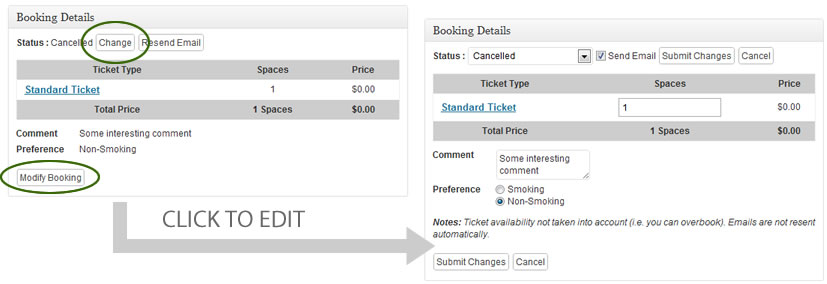
The first line shows the status of the booking as well as two buttons; one allows you to change the status of the booking, the other allows you to resend the booking status email (e.g. if cancelled a cancellation email will be resent).
Next is the tickets table, which breaks down the booking by tickets, and shows values such as taxes, coupons, etc. If you click on individual ticket names, you can view all bookings which are using this ticket in a new page.
Below the tickets table are the fields from the booking form, minus the user fields. To edit this and the ticket quantities, you must first click the Modify Booking button, which will convert all the values into input fields:
Booking Notes
Booking notes allow event admins to add private notes about that specific booking, and this information will only be seen by users who have permission to manage bookings for that event. When you add a new note, it'll appear above the comments box:

Add Offline Payment (pro)
If your attendees pay you offline, e.g. via the phone, check etc., then you may want to record these payments within your bookings.
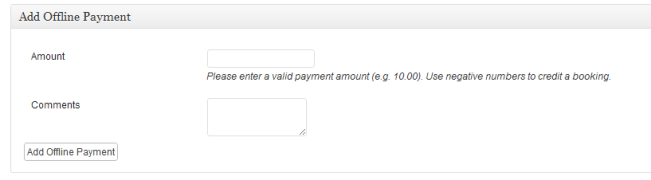
The offline payment form allows you to add partial or full payments as well as refunds (negative numbers). To add an offline payment, simply enter the quantity, an optional comment and click the Add Offline Payment button. If your payment amount is equal to or more than the pending amount for this booking then it will be automatically approved. If you provide a refund (or partial refund), bookings will not automatically revert to Pending.
When you add payments in this way, they will appear in the transaction history as an offline payment, despite whether or not the Offline gateway is enabled on your booking form.
Transaction History (pro)
If you're using Gateways, then you can also view payment history for this specific booking. More information about the transaction history table can be found in the Payment Gateways Overview.