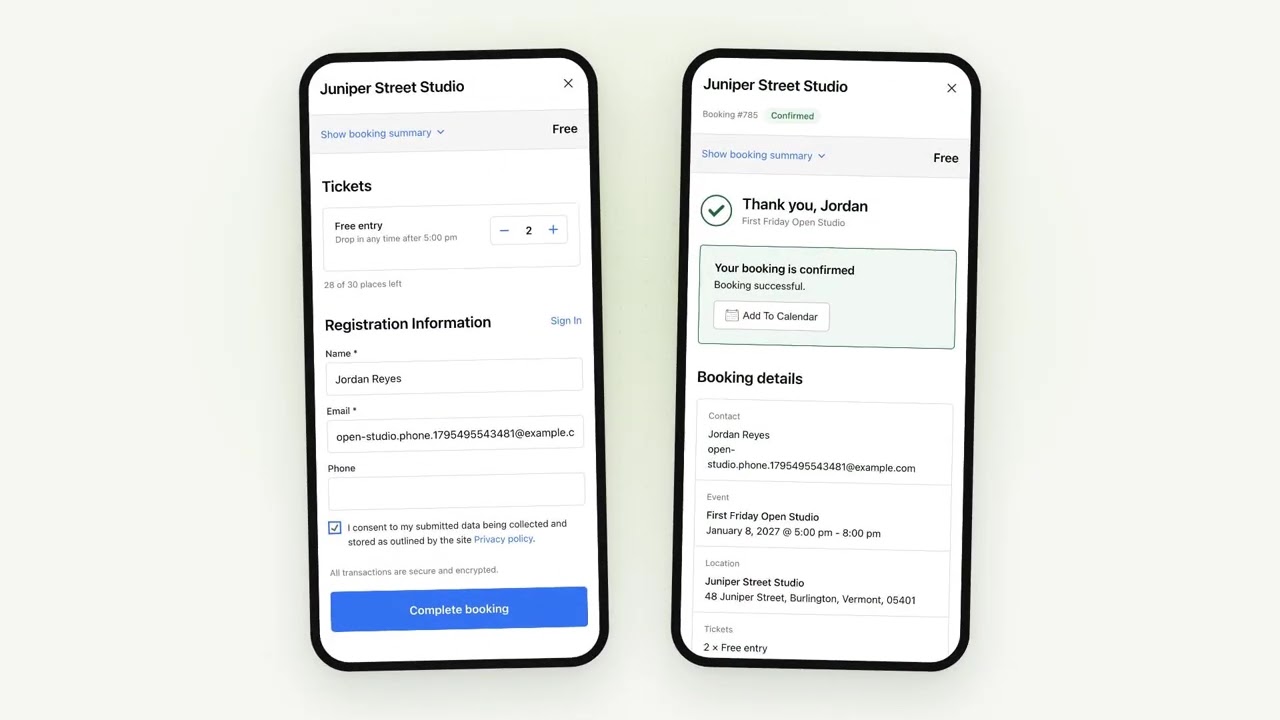
Events Manager 7.7 and Events Manager Pro 3.12 are out today. Most of this update is about one thing, which is what happens between a visitor deciding to book and the booking being confirmed. That part of Events Manager had barely changed in years (the booking form did its job, but it looked like a form from years ago, because it was one).
So there’s a new booking checkout, in the free plugin. Around it, Pro brings its payment features into the same checkout and adds wallet passes, reserved seating arrives as an add-on of its own, and every event page now describes itself to search engines.
A new booking checkout
Instead of a form further down the event page, visitors see a small booking card with the price, the places left and one button. It opens the checkout over the page, with tickets and details on one side and a summary that keeps the total on the other, and the booking is confirmed right there with an Add To Calendar button.
It’s part of the free plugin. New installs get it from the start, and existing sites keep their booking form until you switch the checkout on under Events > Settings > Bookings > Booking Form Options.
Dates and times, chosen in the checkout
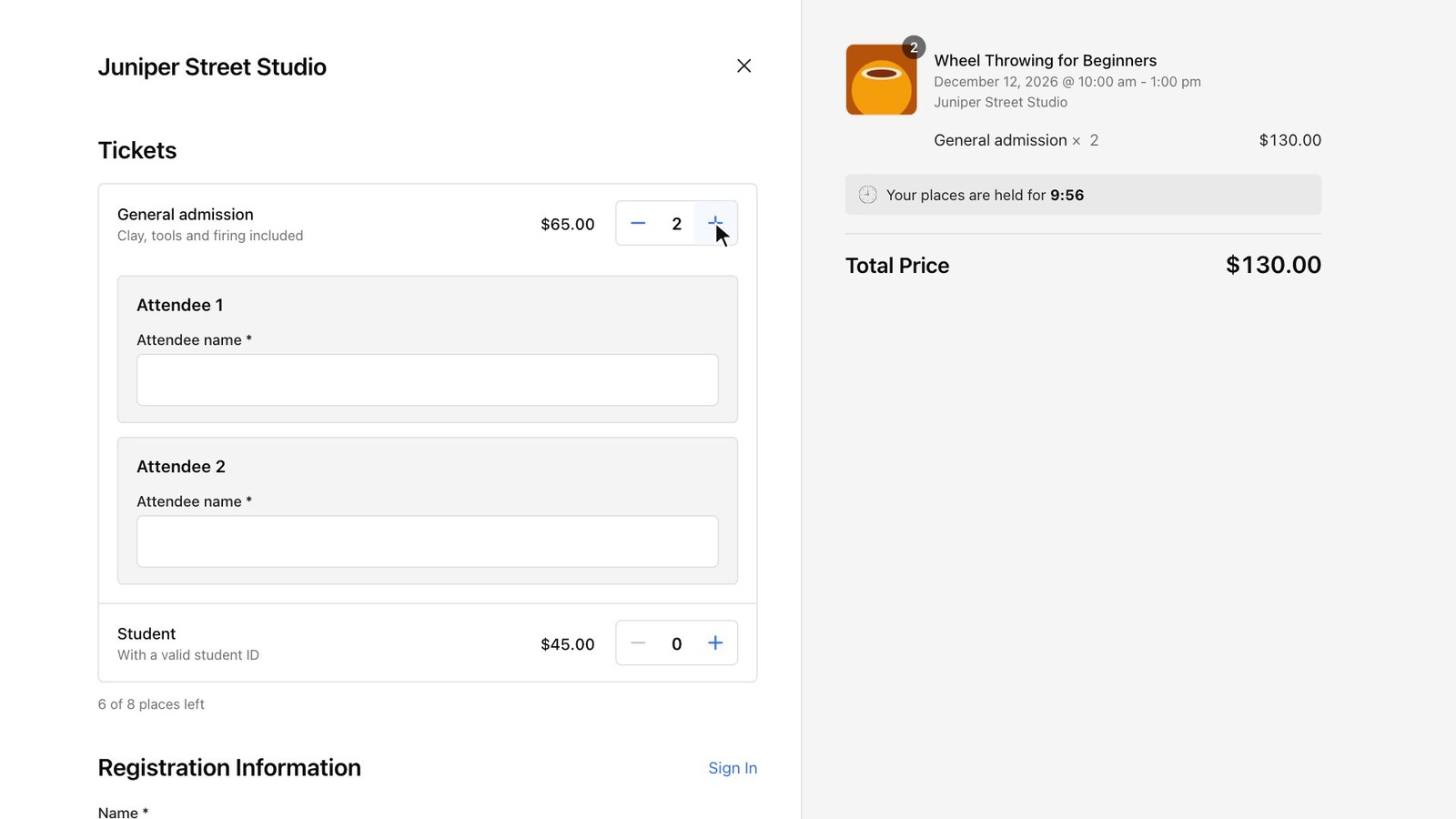
Recurring events and events with time slots used to book through the form on the event page, with a picker above it. They now open in the checkout too, starting with the date or the time. Choose a day on the calendar, then a time, then your places, and they’re held while you fill in the rest.
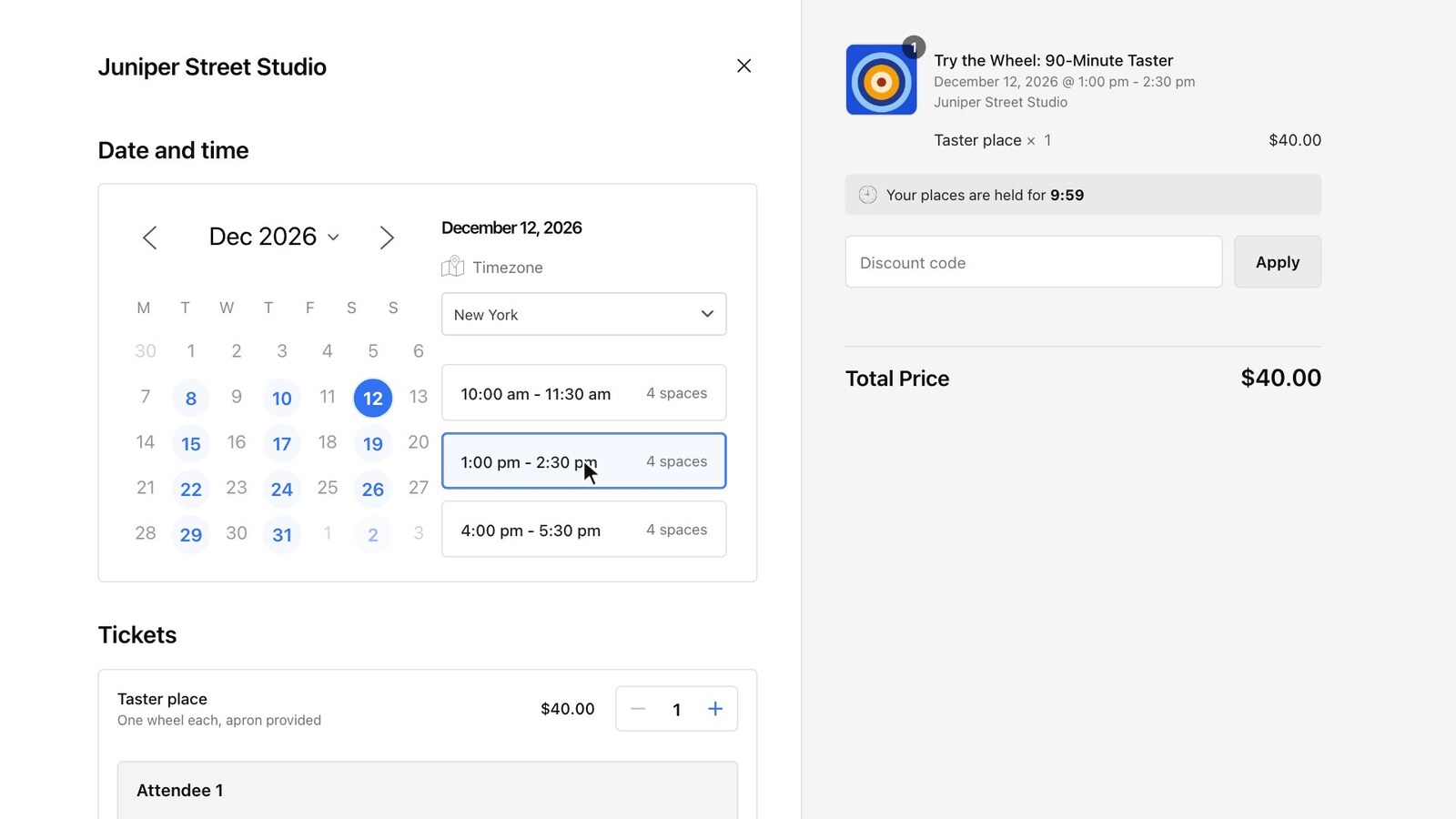
Payments, deposits and coupons in the checkout (Pro)
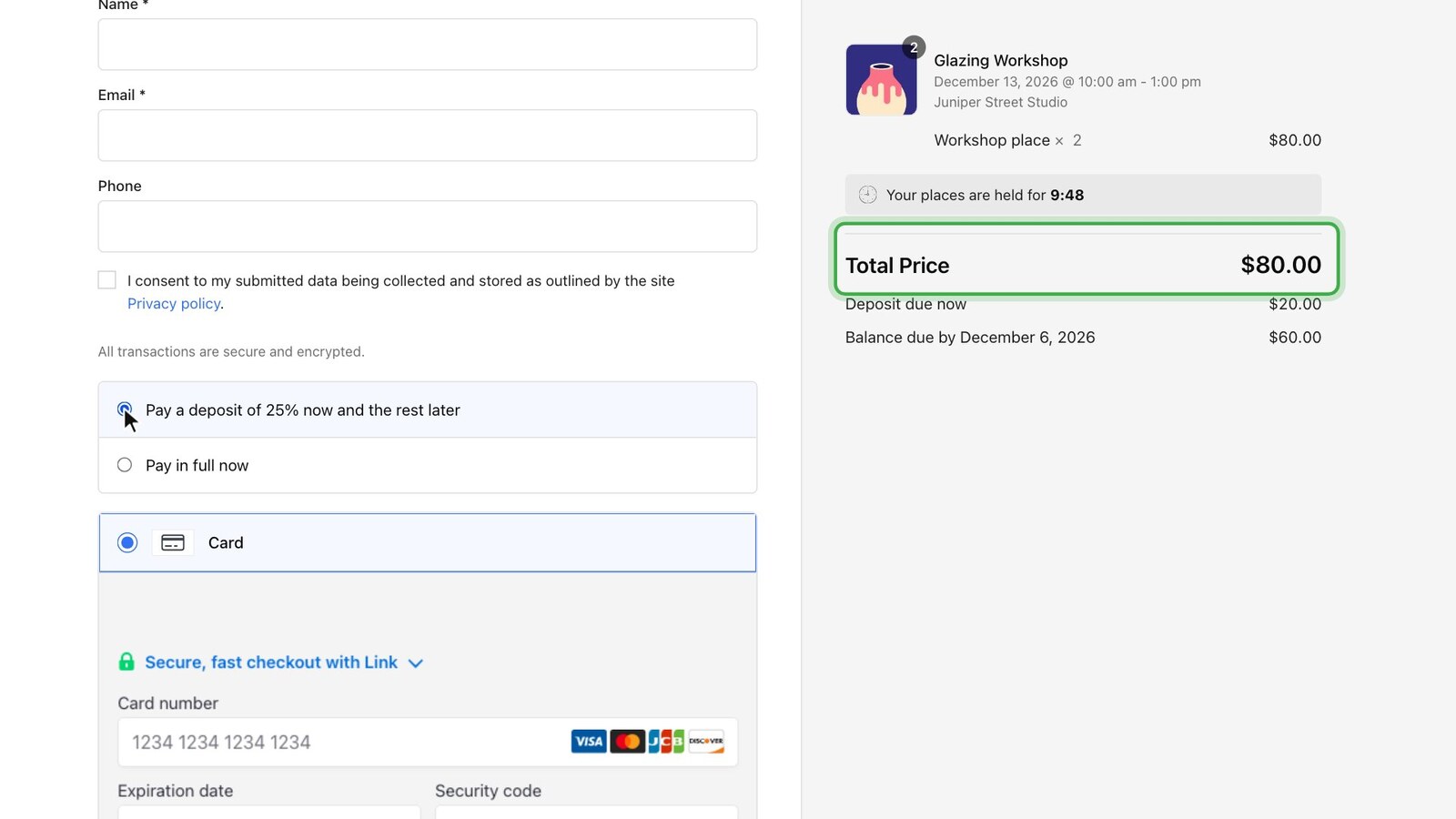
With Pro 3.12, payment is part of the same page. The payment methods are listed with each one’s form beneath it, the discount code goes in the summary, and each attendee gets their own card with your custom fields. If the event takes a deposit, the summary shows what’s due now and when the balance is due.
We’ve tested the checkout with Stripe and with offline payments. The other gateways haven’t been through it yet… which is one more reason it stays off on existing sites until you turn it on, and we’d suggest a test booking with your own gateway before you do.
One checkout for a whole cart (Pro)
In Multiple Bookings mode, an event’s card adds it to the cart, and the cart is checked out once in the same checkout. Deposits work for a whole order too, with each event’s own deposit rule added up. Events booked by date or time still use the booking form in Multiple Bookings mode for now.
Documentation: Multiple Bookings mode
Apple Wallet and Google Wallet passes (Pro)
Tickets can now be added to Apple Wallet and Google Wallet, from the booking email or the My Bookings page. Passes are signed through your Pro license, so there’s no Apple developer account or Google issuer account for you to set up (you can use your own if you have them). You can also design your own passes in your account on our site, for all of your sites or just one, and choose a design per event.
Reserved seating (Pro Plus)
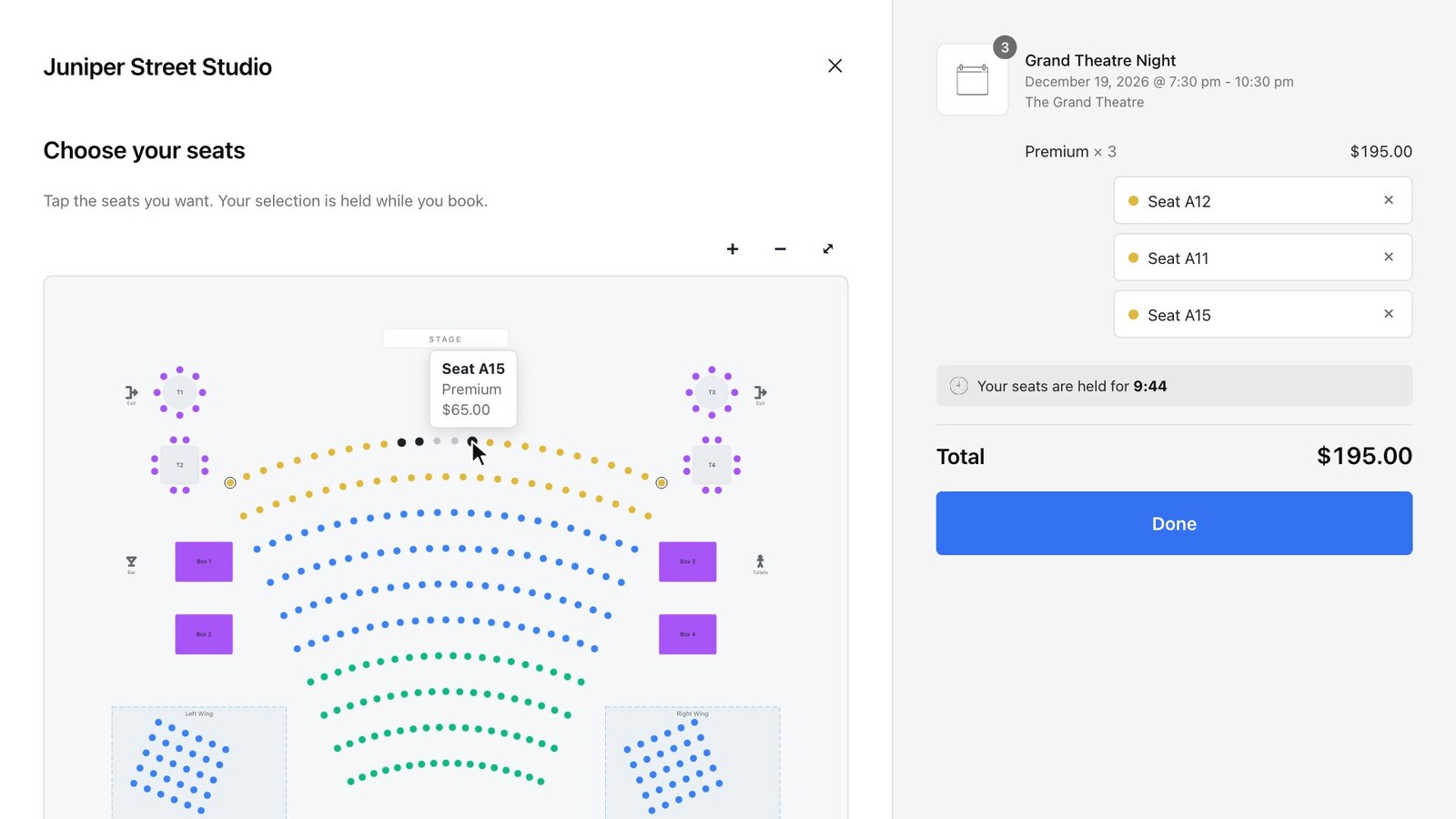
Reserved seating is here, as the new Seats add-on included with Pro Plus. You draw your venue once in our seating designer, with rows, tables, boxes and standing areas, and each category of seat becomes a ticket on your event. Visitors add places and the best seats together are held for them, or they open the map and choose their own. Seat holds and bookings stay on your own site, and there are no per-seat fees.
Structured data for search engines
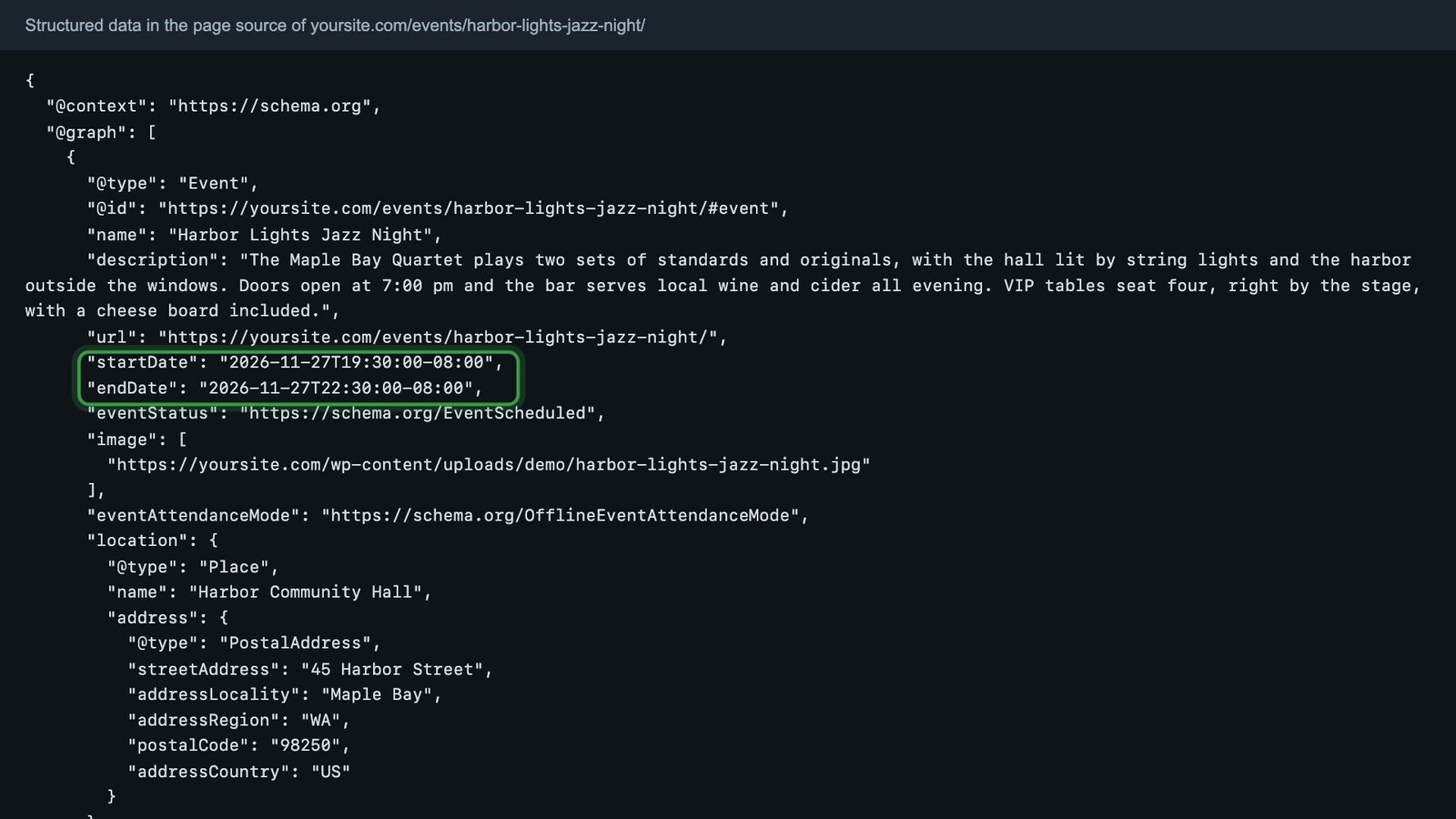
Every published event page now includes structured data, which search engines read for the event’s dates, venue and tickets, and which makes an event eligible to appear in Google’s event results. It’s on by default. If an SEO plugin already adds event structured data to your event pages, turn ours off under Events > Settings > General, or search engines will read every event twice.
Fixes
A payment that fails now shows an error and releases the booking, rather than leaving it half made. Guests can book a time on a recurring event again, and changing the date no longer books the date chosen before it. Free tickets and totals now say “Free” instead of showing a zero. The full list is in the changelogs below.
Security
Events Manager 7.7 includes fixes from our Security Hunt, covering information disclosure of password-protected and non-public events and locations. Thanks to derioii, antokoufis and 4n86rakam1, who are credited in the changelog below. We recommend updating.
Black Friday
Our Black Friday sale runs until Tuesday, December 1, with up to 35% off Pro and Pro Plus, up to 40% off the I/O and Connect add-ons, and a small number of lifetime licenses while they last. If you already have a license, renewing early gets you the sale price too. The details are on the Black Friday page.
Updating
You can update both plugins from the Plugins screen of your WordPress dashboard. If you take card payments with our Stripe add-on, update that too (it’s now at 2.7). On an existing site the booking form stays as it is until you switch the checkout on, and structured data is the one thing that turns itself on.
If anything misbehaves after updating, let us know on the support forums and we’ll take a look.
Changelog
Events Manager 7.7.1
- Added: Option to choose tickets on the event page’s booking card before the booking checkout opens
- Fixed: Booking checkout listing times under the calendar for recurring events with one time per date
- Tweaked: Booking checkout setting description explains how recurring and timeslot events are booked
Events Manager 7.7
- Added: Booking checkout, an optional replacement for the booking form that opens from a booking card on the event page, with an order summary and the booking confirmed in the same place
- Added: Recurring events and events with timeslots choose their date and time inside the booking checkout
- Added: Ticket selection style setting, with plus and minus steppers as an alternative to dropdowns in the booking form
- Added: Add To Calendar button on the booking checkout’s confirmation
- Added: schema.org JSON-LD structured data on event pages, including recurring events, timeslots and canceled events, with a setting to turn it off
- Added: Translations of the new guest password and structured data strings for all bundled languages
- Changed: New installs use the booking checkout and ticket steppers by default, existing sites keep their current booking form until switched in Events > Settings > Bookings
- Changed: Renamed the REST API constant
EM\API\REST::NAMESPACEtoREST_NAMESPACE, as PHP 8.6 deprecates the old name - Tweaked: Booking form summaries say “Free” instead of showing a zero amount
- Tweaked: Links to our sites from the plugin now carry UTM parameters
- Fixed: Guests unable to book a timeslot on a date of a recurring event
- Fixed: Booking form of a previously chosen time staying on screen after choosing another date of a recurring event
- Fixed: Guest accounts being registered before an online payment was made
- Fixed: Tickets on canceled events reporting as available
- Fixed: PHP 8.4 deprecation notice from the bundled mbstring polyfill
- Fixed: PHP 8.5 notice from EM_Bookings::set_event_id()
- Fixed: PHP 8 fatal error in the location search town, state and region options
- Fixed: REST API and Events Manager app returning no bookings for past events when listing an event’s bookings
- Fixed: %s not being replaced with the privacy policy link in the communications consent text
- Fixed: Gap before the full stop in the privacy consent text on sites without a privacy policy page
- Fixed: Unapproved bookings offering no Approve action, in the row menu or bulk actions, when Approval Required is off
- Fixed: Detaching a recurring event occurrence resetting its ticket availability dates to the current day, and edited dates not saving afterwards
- Fixed: Events Manager styling stripped inside Divi sections when using the Divi Builder plugin with another theme
- Fixed: Block themes’ single-event templates and Site Editor event templates being replaced by the page template
- Fixed: Block themes’ event category and tag templates being replaced by the page template
- Fixed: Event category and tag archives showing no events, or past events, due to event archive settings overriding the category and tag archive settings
- Fixed: “infoWindow is not defined” error on single location maps
- Fixed: Deleting a MultiSite site leaving some Events Manager tables behind
- Fixed: Typo in the bookings table attendee confirmation dialog
- Security: Fixed an information disclosure vulnerability affecting password-protected locations, reported by derioii via the Security Hunt
- Security: Fixed a second information disclosure vulnerability affecting password-protected locations, reported by derioii via the Security Hunt
- Security: Fixed an information disclosure vulnerability affecting non-public locations, reported by antokoufis via the Security Hunt
- Security: Fixed an information disclosure vulnerability affecting password-protected events, reported by 4n86rakam1 via the Security Hunt
- Security: Fixed an information disclosure vulnerability affecting password-protected recurring events
Events Manager Pro 3.12
- Added: Payment methods, deposits, coupons and attendee forms in the Events Manager 7.7 booking checkout
- Added: Multiple Bookings mode adds events to the cart and checks the cart out through the booking checkout
- Added: Deposits for a whole order in Multiple Bookings mode, with an option per event to charge it in full
- Added: Cart panel that opens from any cart button in Multiple Bookings mode
- Added: Payment method icons, chosen per gateway in its settings
- Added: Apple Wallet and Google Wallet passes for each attendee, signed through Events Manager Pro or your own Apple and Google accounts
- Added: Wallet pass designs made in the eventsmanagerpro.com pass designer, chosen per site and per event
- Changed: Payment page, pay to post and listing claims now use the booking checkout layout and need Events Manager 7.7
- Changed: Renamed the REST API constant
EM_Pro\API\REST::NAMESPACEtoREST_NAMESPACE, as PHP 8.6 deprecates the old name - Tweaked: Cart page, cart widget and payment page say “Free” instead of showing a zero amount
- Tweaked: Links to our sites from the plugin now carry UTM parameters
- Fixed: Guest accounts being registered before an online payment was made, and left behind when the unpaid booking was deleted
- Fixed: Booking not released when a gateway’s payment step failed in the page
- Fixed: Card payments failing on a second attempt after a failed payment
- Fixed: Default booking form accepting a booking without its required name
- Fixed: REST API returning no name for bookings that take their name from the user account
- Fixed: #_TICKETBOOKING_QR_URL showing as text in booking emails, it now gives the booking’s QR code URL there
- Fixed: Event, booking, ticket and person transaction tables listing every transaction after changing page
- Fixed: Fatal error promoting waitlisted bookings when the waitlist expiry is blank, and an expiry of 0 expiring them at once instead of never
- Fixed: Deleting a MultiSite site leaving Events Manager Pro tables behind
- Fixed: PHP 8.5 notice when checking the cart of a booking not yet saved
Stripe add-on 2.7
- Fixed: Guests unable to pay again after a declined card once they changed their email
- Fixed: Card form unable to take another payment after a failed or canceled one
- Fixed: Booking accepted when the card form could not take its payment
- Fixed: Payment left unfinished when Stripe.js could not confirm it
- Tweaked: Updated the translation template and Spanish translation