Events Manager 7.5 and Events Manager Pro 3.10 are out, and together they make one of the largest updates we’ve released. In our last post we said a set of new features was built and in testing, held back so the security fixes could go out first. This is that set, which is why so much arrives at once.
There are so many changes in fact that we were tempted to bump both plugins up a whole version. We didn’t, because Events Manager 8 and Pro 4 are already spoken for, and what they’re bringing is bigger again than what you’ll read about here. That’s all we’ll say about it for now (more on this soon!).
We’ll keep this post to an overview. Over the coming days we’ll be publishing a showcase for each of the new features here on the blog, and polishing off the documentation as we go (some of it is still being written, as you’ll notice).
Moving from The Events Calendar
Events Manager can now migrate a site from The Events Calendar, which is timely given their move to bundled renewals as of today. It brings over your events, venues, organizers, categories, tags, tickets and attendees, keeps your existing web addresses, and leaves your original data untouched, so you can roll it back if you change your mind. We’ll go through it step by step in its own showcase post.
Translations for over 90 languages
This one is a deliberate departure from how WordPress plugins normally handle translations. The convention is to rely on wordpress.org language packs, built by volunteer translators, and we’re grateful to everyone who has translated Events Manager that way over the years. For many languages though those packs are incomplete or don’t exist, and the result has been sites that are partly or entirely in English.
From 7.5, translations for over 90 languages are included in the plugin itself (on WordPress 6.5 and later). They are powered by AI, and we’ve developed a solid workflow for producing and checking them, which gives a better result than a half-translated site. Some of them will still be imperfect though, and corrections are welcome on our translations site at pixelite.cc.
Translations from wordpress.org take precedence. Wherever a wordpress.org language pack has a translation it is the one used, and ours only fill in the gaps.
Hybrid events and virtual locations
An event can now be in person, online, or both, and on a hybrid event each ticket gives in-person access, online access or both. Online events get a new Custom Link location type, and the link can be hidden until shortly before the event starts. The advanced search form also has an optional filter for online events.
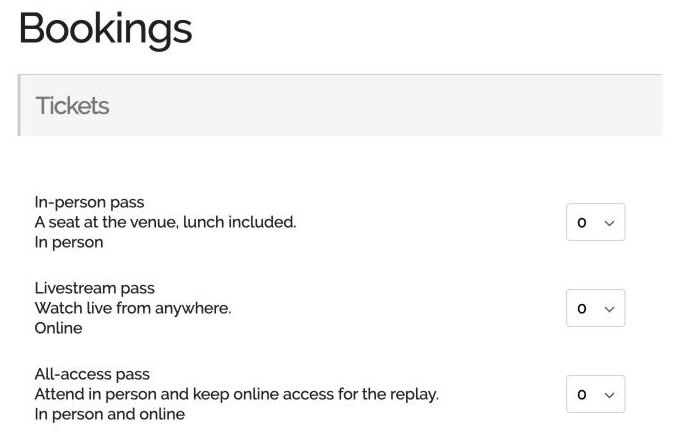
To go with this we have a new range of add-ons for virtual locations, which connect your events directly to the platform they are hosted on. Zoom Pro is available now and adds advanced features to our existing Zoom integration, and add-ons for Google Meet, Facebook Live, YouTube Live and Microsoft Teams will follow shortly.
Importing from a CSV file
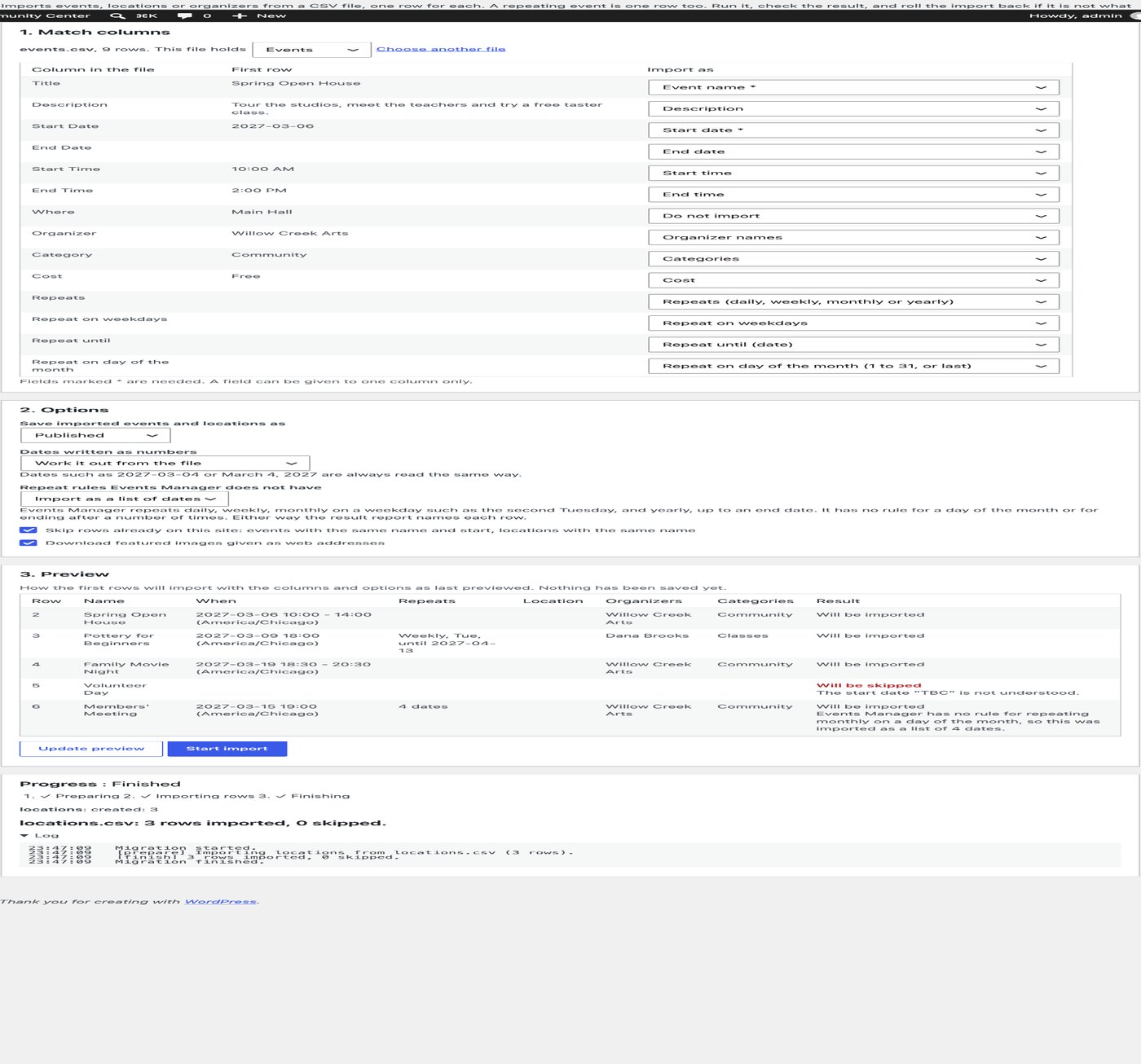
If your events live in a spreadsheet, you can now import events, locations and organizers from a CSV file, under Settings > General > Admin Tools. You see a preview before anything is saved, and each import can be rolled back on its own. It is a one-time import, so tickets and bookings aren’t included.
Spaces held during booking
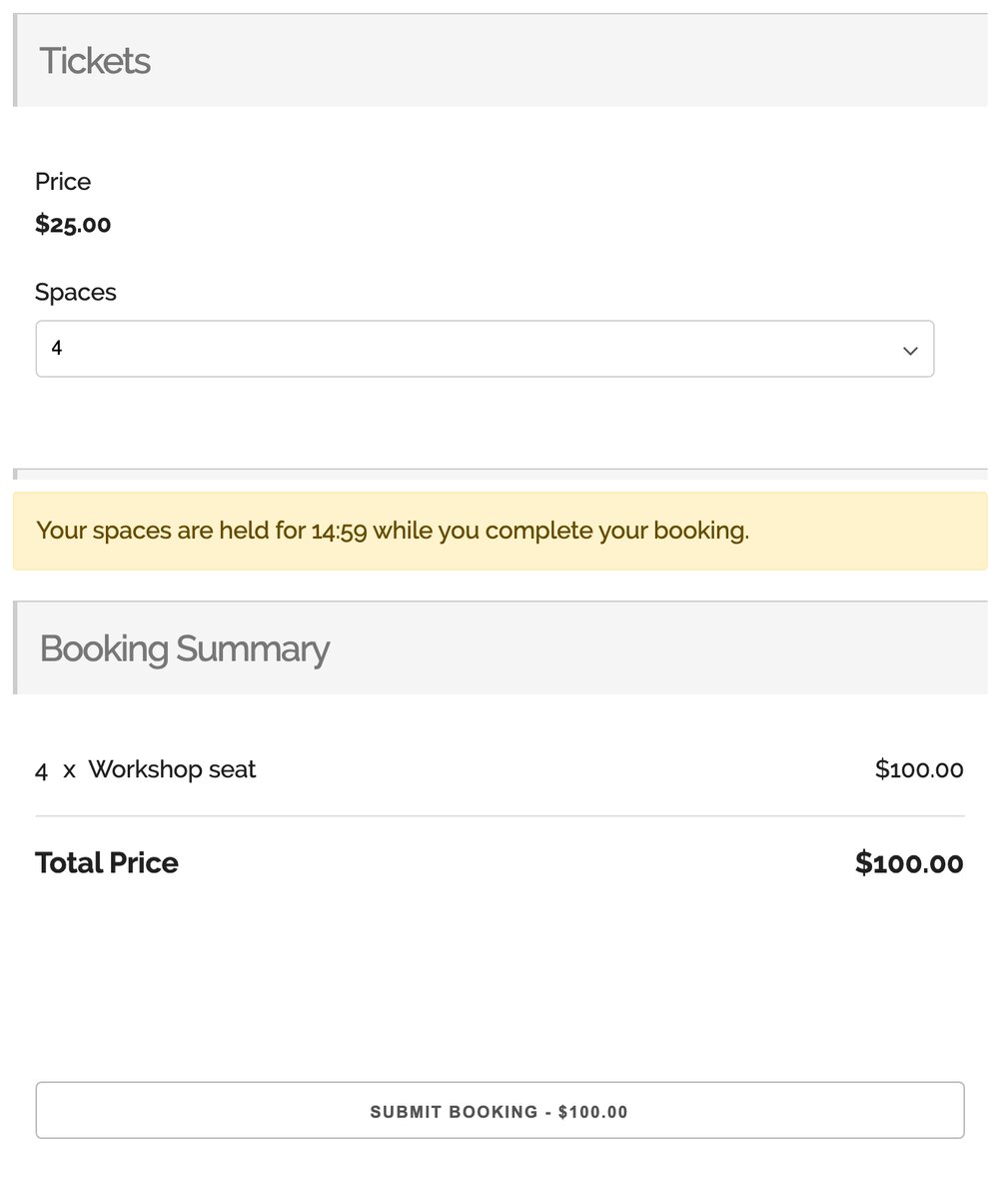
The spaces a visitor picks can now be held for them while they complete the booking form, so the last seats aren’t taken by someone else before they submit. It is off by default, and there are limits per event and per visitor so that holds can’t be used to block an event.
Also in 7.5
Events can now have organizers, each with an email, phone number and website (they are switched off until you enable them in the general settings). The front-end My Bookings and event management lists have status tabs and pagination, and there is a new Events > Add-ons screen listing the Pro plans, our add-ons and the free companion plugins, which can be hidden with EM_HIDE_ADDONS if you’d prefer not to see it.
There is also a security fix and a list of bug fixes, in the changelog below. One worth naming is the calendar’s month navigation, which some crawlers were following endlessly into the past and future, and which now stops at the first and last months that have events.
Events Manager Pro 3.10
Pro 3.10 is mostly about payments, and there is a lot of it.
A unified payment page
Until now, each gateway took payment in its own way and at its own moment, and a booking that wasn’t paid there and then had no good way back to the checkout. Pro 3.10 brings all of that into one unified payment page. It’s a beautiful overlay that opens over your site, showing the booking’s details, its summary and every payment method you offer in one place, and it works just as well on a phone.
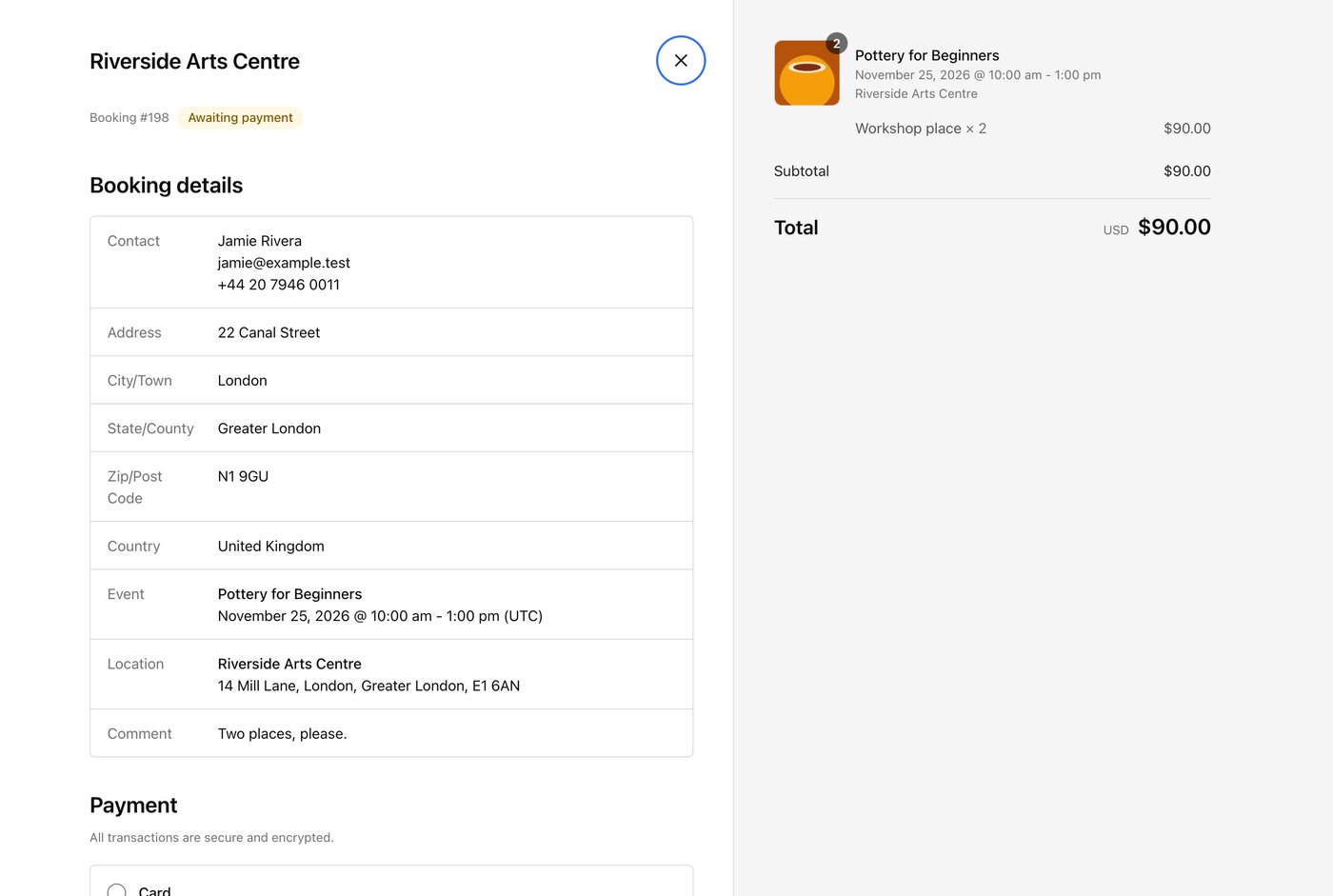
It allows far more flexibility in how and when a booking is paid, and it is optimized against cart abandonment. A payment that is abandoned or declined leaves the booking as it was, so the booker can come back and finish paying from My Bookings, where a Pay now button reopens the same page.
Payment links
Every booking awaiting payment also has its own payment link, which you’ll find on the admin booking page and can send by email, SMS or WhatsApp (there is a placeholder for it too). You can take a booking over the phone, add it yourself and send the booker a link to pay, and a link can be reset so that ones sent earlier stop working.
Partial payments
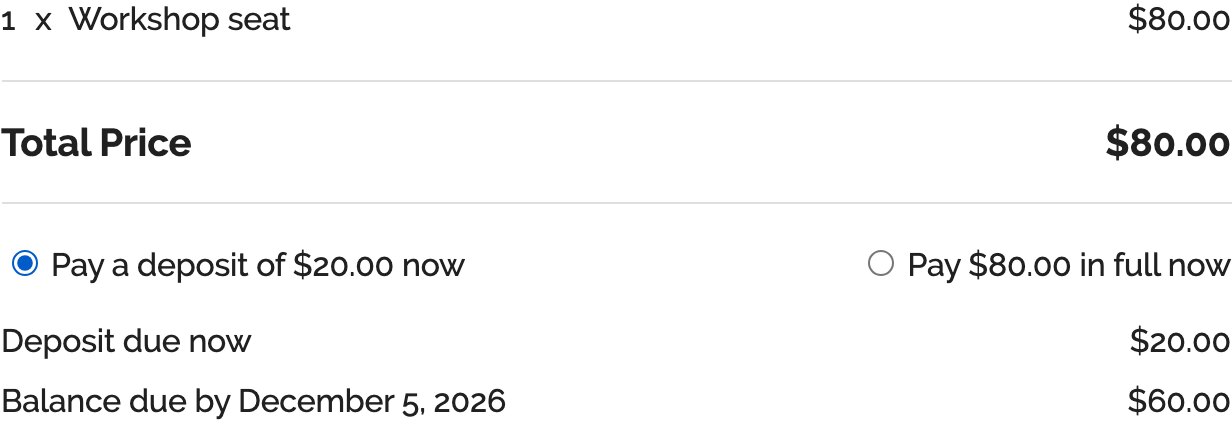
Events can take a deposit when the booking is made, as a percentage, an amount per booking or an amount per space, with the balance paid later from the payment page. The booking keeps its spaces in the meantime, and reminders go out before the balance is due (and an overdue notice after it), each with the payment link.
Pay to post and claim links
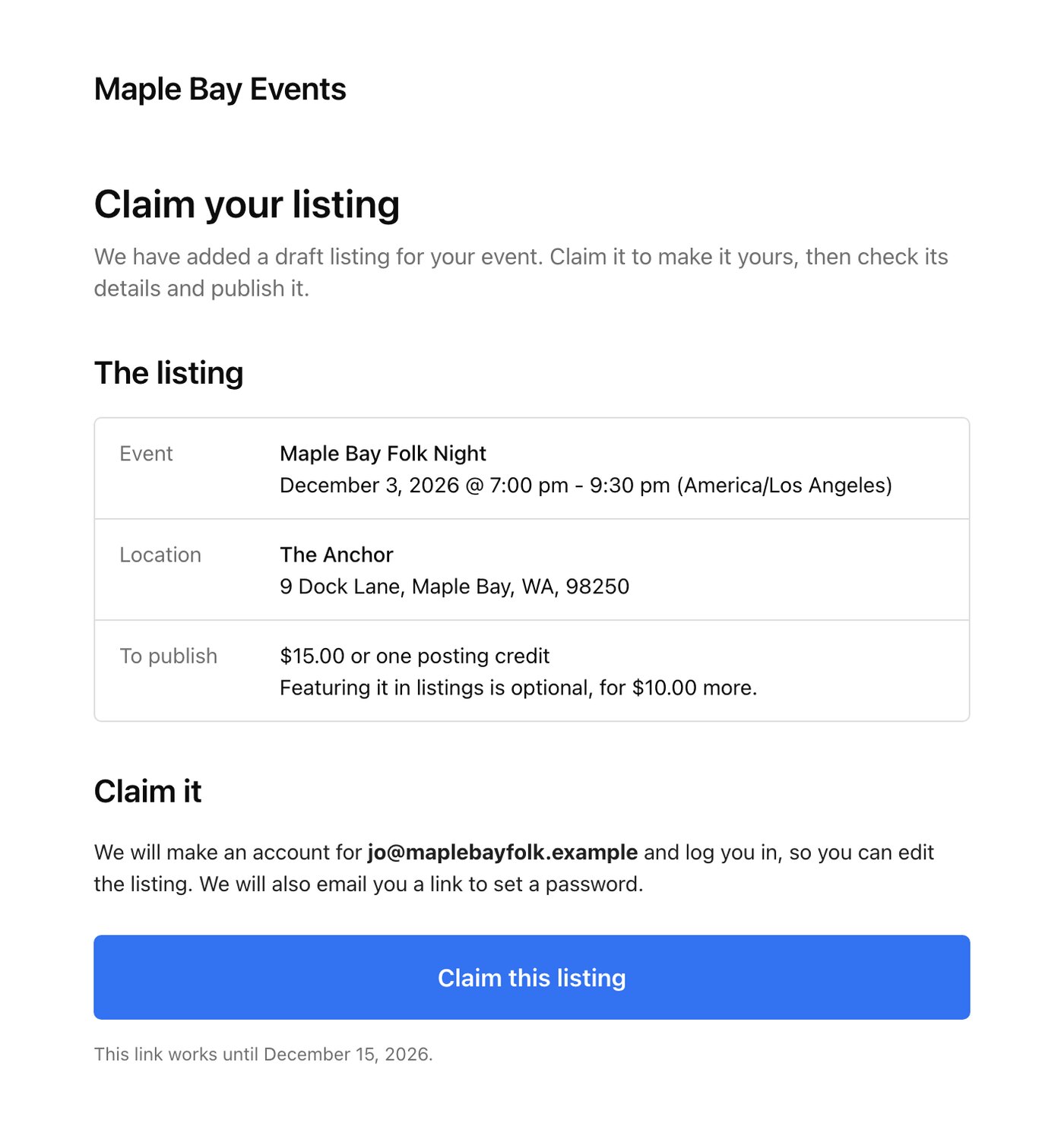
If your site lists other people’s events, you can now charge organizers a fee to post an event from your front-end submission form, a little more to have it featured, and sell posting credits in packs to those who post often. They pay on the same payment page your bookings use.
Claim links are the part of this we think opens the biggest door. You create an event on your site yourself as a draft, send its organizer a link, and when they claim it the event becomes theirs to check, edit and pay to publish. A listings site no longer has to wait for organizers to come to it, which for some sites could be a whole new source of revenue.
Moving bookings
You can now move a booking to another event from the admin booking page, comping or charging any difference in price, with an optional email telling the booker about the move.
Add-ons and what’s next
We’ve also changed how add-ons are sold, and they can now be bought on their own. The new virtual location add-ons mentioned above are the first to be sold that way, starting with Zoom Pro.
Still to come is split payments through Stripe, where a payment is divided between your site and the event’s organizer so that a site taking bookings for other people’s events can keep a commission. It will arrive later as an add-on of its own for Pro Plus customers.
Black Friday
Our Black Friday sale is on, so if you’ve been considering Events Manager Pro, this is a good moment to look. The details are on the Black Friday page.
Updating
You can update both plugins from the Plugins screen of your WordPress dashboard. Most of what’s new does nothing until you use it or switch it on. What does change straight away is the event editor, which now asks for a location by attendance mode, the tabs on My Bookings and the front-end event list, the new Add-ons screen, and more of Events Manager appearing in your language if your site isn’t in English.
If anything misbehaves after updating, let us know on the support forums and we’ll take a look.
Changelog
Events Manager 7.5
- Added: Migration tool for The Events Calendar, bringing over events, venues, organizers, categories, tags, tickets and attendees while keeping your existing web addresses
- Added: One-time CSV import of events, locations and organizers, under Settings > Admin Tools
- Added: Hybrid events, with in-person and online ticket access on the same event
- Added: Virtual locations with a Custom Link type, and an option to hide the link until shortly before the event starts
- Added: Online events filter for the advanced search form
- Added: Event organizers as a taxonomy
- Added: Spaces can be held while a visitor completes the booking form, with limits per event and per visitor, off by default
- Added: Status tabs and pagination on the front-end My Bookings and event management lists
- Added: Events > Add-ons screen listing the Pro plans, add-ons and free companion plugins, which can be hidden with
EM_HIDE_ADDONS - Added: Translations for over 90 languages are now included with the plugin on WordPress 6.5 and later, filling in wherever a wordpress.org language pack has no translation
- Changed: The event editor now chooses a location by attendance mode: in person, online, or both
- Security: Fixed an information disclosure issue in the REST API
- Fixed: Crawlers following the calendar’s month navigation endlessly
- Fixed: Recurring events saved after another post in the same request getting no recurrences
- Fixed: Recurrence data left in the database after deleting a recurring event
- Fixed: Deleting one date of a recurring event removing the whole series’ location link text
- Fixed: PHP notice when deleting tickets of a recurring event
- Fixed: Stale booking counts on sites with a persistent object cache after a booking confirmation email was sent
- Fixed: Sites with several connected OAuth accounts always using the first one, and refresh tokens being lost when a provider did not send a new one
- Fixed: Saving settings blocked with a 403 by some host firewalls, due to hidden formatting fields being submitted
- Fixed: Broken placeholders link and a PHP deprecation notice in the map format settings
- Fixed: PHP 8.2 deprecation notice on every page load on sites running BuddyPress
Events Manager Pro 3.10
- Added: Payment page for paying a booking awaiting payment from My Bookings or a payment link, turned on in the payment gateway settings
- Added: Payment links on the admin booking page and as the #_BOOKINGPAYURL placeholder, to send a booking for payment by email, SMS or WhatsApp
- Added: Resetting a booking’s payment link, so links sent before stop working
- Added: pay_url field on bookings in the REST API and MCP for people who manage the booking
- Added: PayPal Standard payments from the payment page
- Added: $supports_payment_page gateway flag, em_gateway_return_url and em_gateway_cancel_url filters, and checkout templates themes can override
- Added: Moving a booking to another event from the admin booking page, matching tickets by name or by hand
- Added: Comping the price difference of a moved booking, or charging it by setting the booking to Awaiting Payment
- Added: Optional email telling the booker their booking was moved, with a payment link when there is something to pay
- Added: EM\Bookings\Move class with the em_booking_moved action for moving bookings in code
- Added: REST endpoints and MCP abilities to list destinations for, preview and carry out a booking move
- Added: Notice when the new event’s booking or attendee form asks for details a moved booking does not have
- Added: Partial payments, so events can take a deposit by percentage, amount per booking or amount per space and the balance is paid later from the payment page
- Added: Deposit Paid booking status that keeps the booking’s spaces until the balance is paid, with its own booker and admin emails
- Added: Balance reminders before the balance is due and an overdue notice after it, each with the payment link
- Added: Balance reminder log and a Send balance reminder now button on the admin booking page
- Added: #_BOOKINGAMOUNTPAID, #_BOOKINGAMOUNTDUE, #_BOOKINGDEPOSIT and #_BOOKINGBALANCEDUEDATE placeholders
- Added: $supports_partial_payments gateway flag and Gateways::get_charge() for gateways charging a deposit or balance
- Added: Pay later as a payment method on the payment page, for bookings made to pay offline
- Added: Hybrid events support, showing each booking its venue, online location or join link in the cart, RSVP card, PDF tickets and invoices according to what its tickets give access to
- Added: Join link on PDF tickets, PDF event details and the RSVP card for virtual and hybrid events
- Added: Check-in for online-only tickets on hybrid events, and a check-in QR code on every ticket
- Added: Email sending attendees their join link when a hidden virtual link is released, with its own template under Event Email Reminders
- Added: Multiple Bookings carts hold the spaces of each event in the cart until checkout when booking holds are on in Events Manager, with a Cart Hold setting
- Added: Pay to post, charging a fee to publish an event submitted from the front-end event form, off by default under Settings > Bookings
- Added: Featured events as a paid option, with the featured search attribute, #_EVENTFEATURED placeholder and {is_featured} conditional
- Added: Posting credits, bought in packs and spent in place of the posting fee, with balances and history on the My Events page and under Events > Posting credits
- Added: [em_posting_credits] shortcode showing a user’s credit balance, packs to buy and events waiting for their fee
- Added: Claim links, so an admin can create a draft event and invite its owner to claim it, pay the posting fee and publish it
- Added: MCP abilities to create, view and cancel claim links
- Added: $supports_orders gateway flag for gateways taking payment for posting orders
- Added: Translations for 99 locales are now included with the plugin on WordPress 6.5 and later
- Changed: My Bookings shows Pay now instead of each gateway’s Resume Payment button while the payment page is on
- Tweaked: An abandoned, declined or expired payment page payment leaves the booking as it was instead of deleting or cancelling it
- Tweaked: Bookings still on hold are left out of coupon uses, automations and admin tools
- Fixed: Fatal error from a payment cancellation link naming a class that is not a gateway
- Fixed: Moving a booking to another date of a recurring event failing when the event has more than one ticket
- Fixed: Moving a booking not checking the spaces left at the new date or time
- Fixed: PDF event details showing the dates instead of the location for online events
- Fixed: PDF tickets leaving the town out of the venue address