✅ Check-in · Attendance · Pro

Scan them in. Know who showed.

Track attendance and check people in on the day — fast at the door, accurate in your reports, all on your own site.

Mark who attended   Per-event attendee lists   Verify against your own records

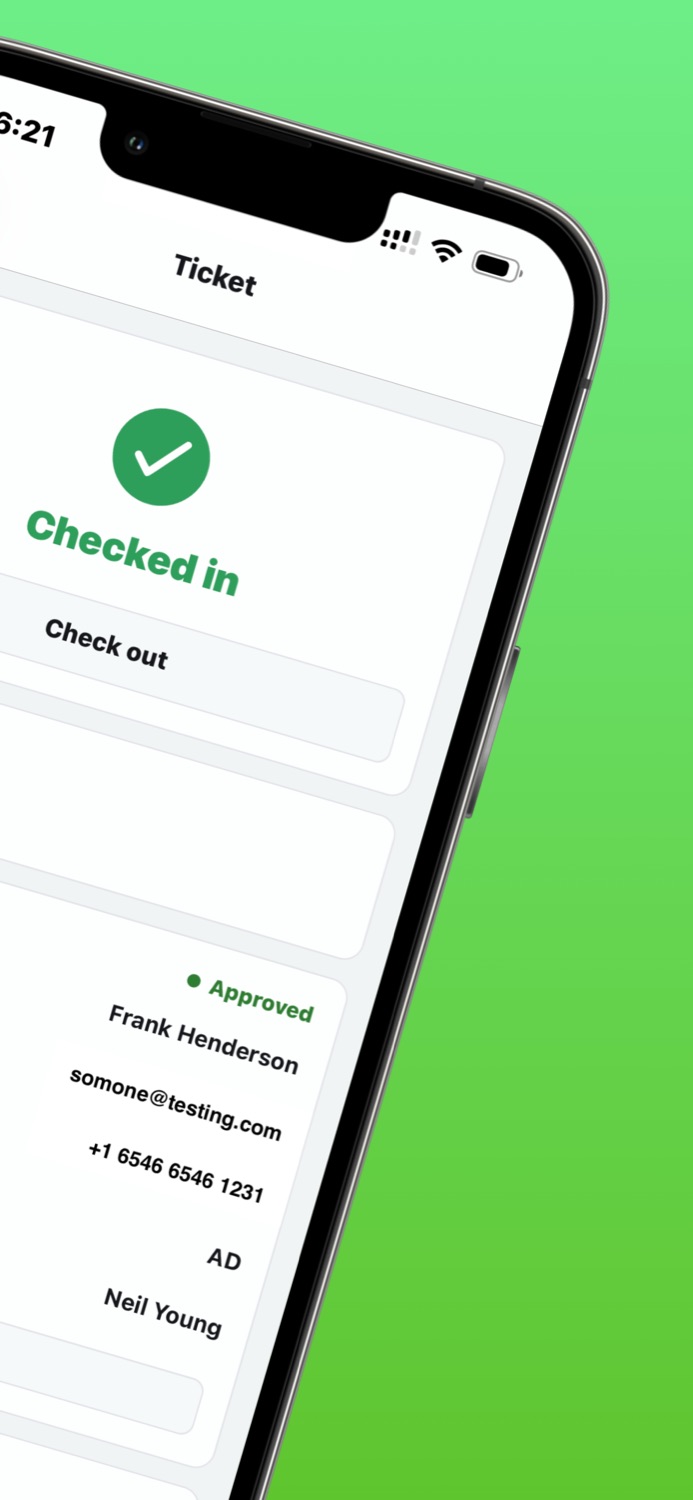
The Events Manager app showing an attendee checked in at the door

The booking list is sold. Now run the door.

Selling the ticket is only half the job. On the day you still need to know who actually walked in — for capacity, for safety, and for the follow-up afterwards. Events Manager Pro turns every booking into a check-in you can tick off.

Mark who attended

Built-in attendance tracking in Events Manager Pro lets you mark attendees as attended and see, per event, exactly who turned up.

A list per event

Each event has its own attendee list you can work straight down on the day — no spreadsheets, no clipboard, no guessing who's still outside.

Verify on the spot

Check a booking or ticket against your own records before you wave someone through — the data lives in your WordPress database, not a third party's.

Three taps at the door

From "is this person on the list?" to a clean attendance record — without leaving your own site.

1

Open the event's list

Pull up the attendee list for today's event. Everyone who booked is there, ready to work down one by one.

2

Check the booking

Match the person to their booking or ticket against your own records, so only people who actually booked get marked in.

3

Mark them attended

Tick them off as attended. Your live count climbs and the record is saved against the event for reporting later.

Built for the way real doors work

Whatever you're running, attendance tracking gives you a record of who actually came — not just who booked.

Workshops & classes

Check people in at the door of a workshop or class and see the room fill up against capacity in real time.

Conference badge & ticket scanning

Verify tickets as attendees arrive and keep a running attendance list across every session and day.

Tracking no-shows

Whoever's left unmarked at the end is your no-show list — ready to follow up, re-engage or chase next time.

Recurring class registers

For recurring classes, mark attendance week after week and build up a register of who came to each session.

New · Mobile App

Scan tickets at the door, fast

Attendance tracking pairs with the new Events Manager mobile app for fast ticket scanning at the door — point the phone, read the ticket, mark them in. Your booking data stays on your own site the whole time.

Meet the mobile app
Checked in

What attendance tracking gives you

The check-in toolkit that comes with Events Manager Pro — on your own site, against your own data.

At the door

  • Mark attendees as attended per event
  • See who has and hasn't turned up
  • Verify bookings & tickets against your records
  • Pairs with the mobile app for ticket scanning

Per-event lists

  • A dedicated attendee list for every event
  • Work straight down it on the day
  • Track attendance for recurring classes
  • Spot no-shows for follow-up

On your own site

  • Attendance data stays in your WordPress database
  • No third-party platform in the middle
  • Built into Events Manager Pro
  • Works alongside bookings & ticketing
★ Events Manager Pro

Attendance tracking is a Pro feature

Bookings are built into the free plugin. Marking people attended — the built-in attendance tracking, per-event check-in lists and ticket verification — comes with Events Manager Pro.

  • Built-in attendance tracking
  • Mark attendees as attended
  • Per-event attendee lists
  • Verify bookings & tickets
  • Mobile-app ticket scanning
  • Your data, your site
See Pro pricing

Know who showed — every event, every time.

Run a tighter door on the day

Check people in, track who showed, and keep every attendance record on your own site. Try it free in a live sandbox, then go Pro when you're ready.